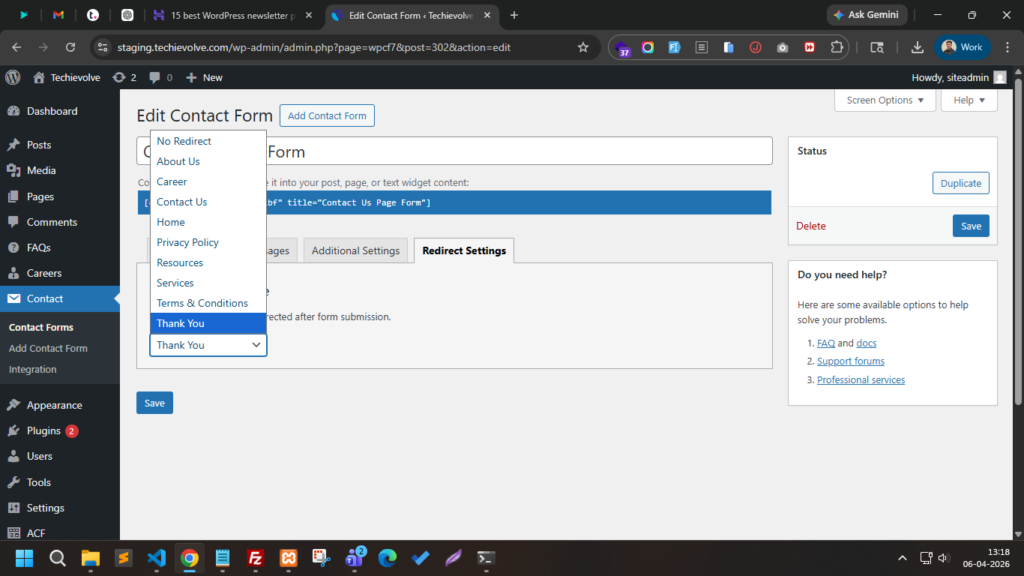

When using Contact Form 7, many developers want to redirect users to a thank-you page after form submission. While some plugins provide this feature, you can implement it yourself with a small custom code snippet.
In this guide, we will create a custom “Redirect Settings” tab inside the form editor and allow administrators to select a page where users will be redirected after submitting the form.
This method keeps your site lightweight because it does not rely on additional plugins.
Why Add Redirect After Form Submission?
Redirecting users after submitting a form can be useful for several reasons:
- Show a Thank You page
- Track conversions using analytics
- Display additional information or offers
- Improve user experience
Instead of showing the default message from Contact Form 7, users will automatically land on a specific page you choose.
Now, see this below code and make sure if you are a core wordpress developer, so just copy this below code and paste into theme folder ‘functions.php’ and if you are non-techi then just open file manager of your hosting and paste the below whole code into functions.php below ….
/** Redirect Tab In Contact Form 7 Start */
// custom tab
add_filter('wpcf7_editor_panels', 'cf7_add_redirect_panel');
function cf7_add_redirect_panel($panels) {
    $panels['redirect-panel'] = array(
        'title' => __('Redirect Settings', 'cf7'),
        'callback' => 'cf7_redirect_panel_callback'
    );
    return $panels;
}

// panel content
function cf7_redirect_panel_callback($post) {
    $form_id = $post->id();
    $selected_page = get_post_meta($form_id, '_cf7_redirect_page', true);
    $pages = get_pages();
?>
<div class="cf7-redirect-wrap">
    <h2>Select Redirect Page</h2>
    <p>If selected, user will be redirected after form submission.</p>
    <select name="cf7_redirect_page">
        <option value="" <?php selected($selected_page, ''); ?>>
            No Redirect
        </option>

        <?php foreach ($pages as $page) { ?>
            <option value="<?php echo esc_attr($page->ID); ?>"
                <?php selected($selected_page, $page->ID); ?>>
                <?php echo esc_html($page->post_title); ?>
            </option>
        <?php } ?>
    </select>
</div>
<?php
}


// save settings page value
add_action('wpcf7_save_contact_form', 'cf7_save_redirect_page');
function cf7_save_redirect_page($contact_form) {
    if (!isset($_POST['cf7_redirect_page'])) {
        return;
    }
    $page_id = sanitize_text_field($_POST['cf7_redirect_page']);
    update_post_meta(
        $contact_form->id(),
        '_cf7_redirect_page',
        $page_id
    );
}


// redirect script
add_action('wp_footer', 'cf7_redirect_script');
function cf7_redirect_script() {
?>
<script>
document.addEventListener('wpcf7mailsent', function(event) {
    var formID = event.detail.contactFormId;
    <?php
    $forms = get_posts(array(
        'post_type' => 'wpcf7_contact_form',
        'numberposts' => -1
    ));

    foreach ($forms as $form) {
        $page_id = get_post_meta($form->ID, '_cf7_redirect_page', true);
        if ($page_id) {
            $url = get_permalink($page_id);
            echo "if(formID == {$form->ID}) { window.location.href = '{$url}'; }";
        }
    }
    ?>
}, false);
</script>
<?php
}
/** Redirect Tab In Contact Form 7 End */
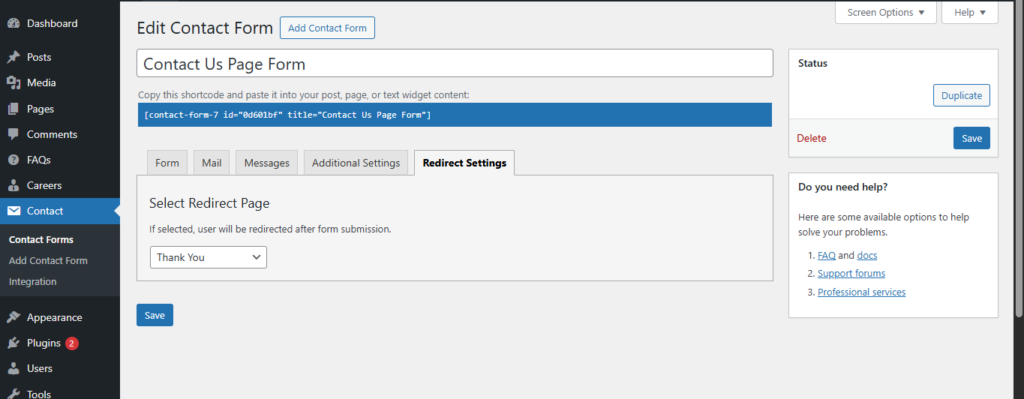
Here is the result which you might see in contact form 7 forms ….