



Draxira: The Ultimate Dummy Content Generator for WordPress Developers
Introduction
Every WordPress developer knows the struggle of testing a new theme or plugin. You need realistic content to see how everything looks and functions, but creating sample posts, products, and users manually is time-consuming and tedious.
Enter Draxira – a powerful, feature-rich dummy content generator that transforms the way you test and develop WordPress sites.
In this post, we’ll explore everything Draxira can do, from generating realistic blog posts to creating complex WooCommerce products with variations.
What is Draxira?
Draxira (pronounced drax-ee-ra) is a free WordPress plugin that generates realistic dummy content for testing and development purposes. Unlike basic content generators that just create lorem ipsum text, Draxira uses the Faker PHP library to generate human-like, contextual content that actually looks and feels real.
Key Features at a Glance
| Feature | Description |
|---|---|
| 📝 Posts & Pages | Generate content for any public post type |
| 👥 Users | Create dummy users with custom roles and meta fields |
| 🛍️ WooCommerce Products | Full product generation with variations and attributes |
| 🔧 ACF/CMB2 Support | Automatically detects and fills custom fields |
| 🏷️ Taxonomies | Auto-create categories, tags, and custom taxonomies |
| 🖼️ Media | Add featured images and product galleries |
| 🗑️ Bulk Delete | Remove all dummy content with one click |
| 🌍 Multilingual | Fully internationalized for global use |
Why Developers Love Draxira
1. Realistic Content Generation
Gone are the days of “Lorem ipsum dolor sit amet.” Draxira generates meaningful content using the Faker library:
- Real names like “John Smith” or “Maria Garcia”
- Valid email addresses like
johndoe@example.com - Realistic addresses with proper formatting
- Company names, phone numbers, and URLs
- Coherent paragraphs that actually make sense
2. Intelligent Custom Field Support
If you use ACF (Advanced Custom Fields) or CMB2, Draxira automatically detects your fields and lets you configure how they should be filled:
// ACF text field → "The quick brown fox jumps over the lazy dog"
// ACF number field → Random number between 1-100
// ACF email field → Valid email address
// ACF image field → Random placeholder image URL
3. Complete WooCommerce Product Generation
This is where Draxira truly shines. Unlike other dummy content plugins that only generate simple products, Draxira creates:
- Simple Products with prices, SKUs, and stock
- Variable Products with multiple attributes and variations
- Product Categories with hierarchy support
- Product Tags and attributes
- Featured Images from the CSV data
- Product Galleries from built-in assets
4. Clean Code with Best Practices
Draxira is built with WordPress coding standards and includes:
- Proper nonce verification for security
- Sanitization of all user inputs
- Internationalization (i18n) for translations
- Singleton pattern for efficient memory usage
- Clean uninstall script that removes all data
Real-World Use Cases
🎨 Theme Development
When building a WordPress theme, you need to see how it handles different content types:
- Test your blog layout with 50+ posts
- See how featured images display in different contexts
- Verify category and tag archives work correctly
- Check user profile pages with dummy users
🛒 WooCommerce Store Setup
Creating a demo store for clients? Draxira can populate your entire store with:
- 50+ products with realistic names and prices
- Product variations (size, color, material)
- Product categories with proper hierarchy
- Customer accounts with shipping/billing addresses
🔧 Plugin Compatibility Testing
Before launching a new plugin or updating an existing one, test it with:
- 500+ posts to check database performance
- 100+ users to test user management features
- Complex taxonomies to verify term handling
- Custom fields to ensure ACF/CMB2 compatibility
How to Get Started
Step 1: Install Draxira
Option A – From WordPress Admin:
- Go to Plugins → Add New
- Search for “Draxira”
- Click Install Now → Activate
Option B – Manual Installation:
- Download the plugin from WordPress.org
- Upload to
/wp-content/plugins/ - Activate from the Plugins menu
Step 2: Generate Your First Dummy Content
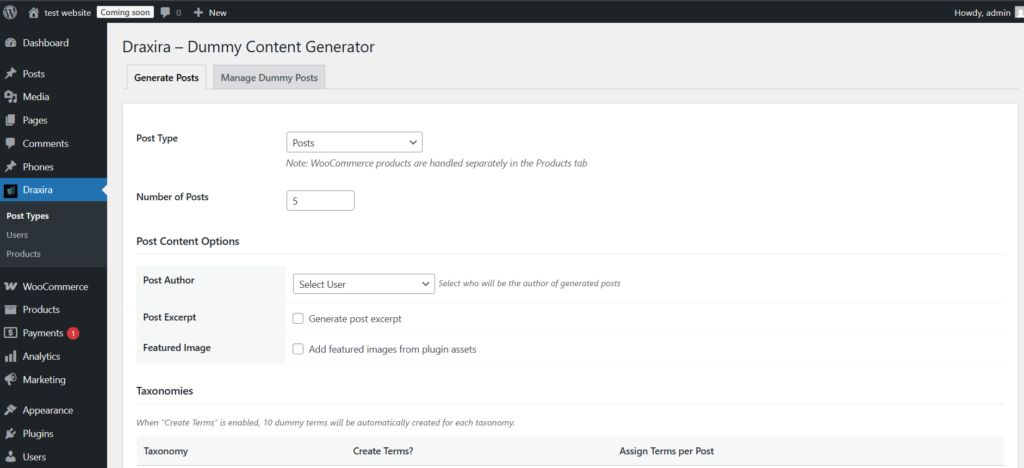
- Navigate to Draxira in your admin menu
- Choose from three tabs:
- Post Types – For posts, pages, and CPTs
- Users – For user accounts
- Products – For WooCommerce products
- Configure your options:
- Select content type
- Choose number of items
- Set authors or roles
- Enable/disable images
- Click Generate and watch the magic happen!
Step 3: Manage Your Dummy Content
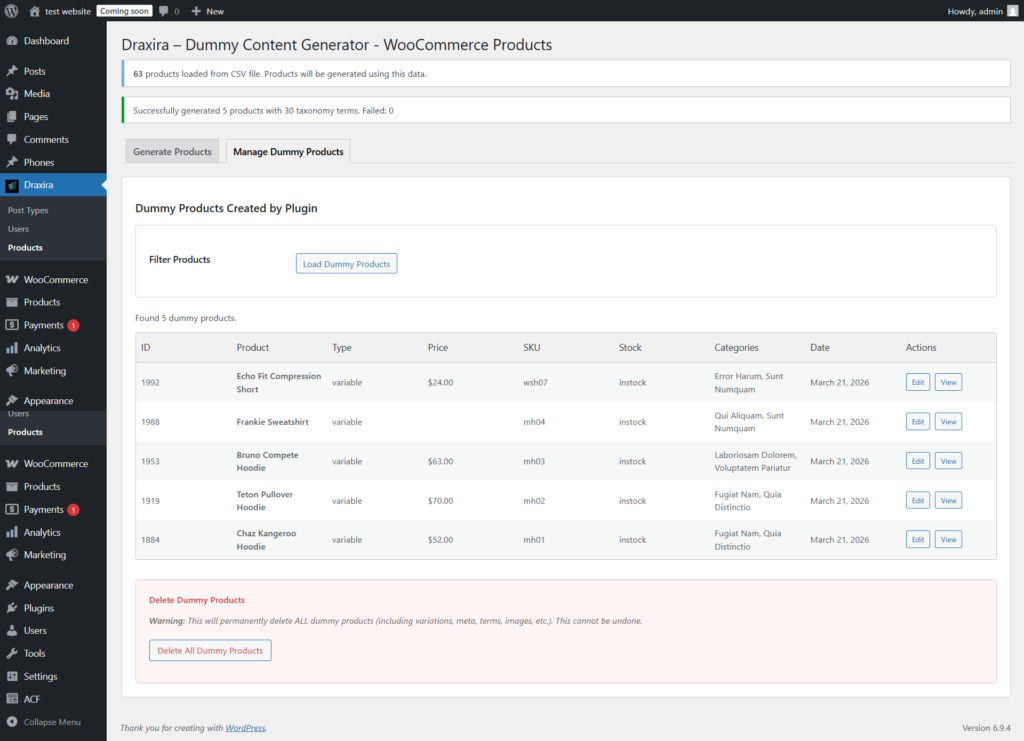
Need to clean up? The Manage tab lets you:
- View all generated content
- Delete individual items
- Bulk delete everything at once
- Filter by content type
Advanced Configuration Tips
Working with Custom Post Types
Draxira automatically detects any public custom post type. To generate content for your CPT:
- Go to Draxira → Post Types
- Select your CPT from the dropdown
- Configure taxonomies and custom fields
- Generate!
Setting Up Custom Fields
When ACF or CMB2 is active, Draxira displays all your fields with intelligent defaults:
- Name fields → Real names
- Email fields → Valid email addresses
- Number fields → Random numbers
- Text fields → Coherent sentences
- Date fields → Random dates
- Boolean fields → Yes/No values
Creating Realistic Products
Draxira comes with a CSV file containing real product data. To customize:
- Edit
woo-data/woo.csvin the plugin folder - Add your own product names, descriptions, and images
- Generate products using your custom data
Performance Benchmarks
Draxira is optimized for performance, even with large datasets:
| Operation | Time (approx) |
|---|---|
| 100 posts with images | 3-5 seconds |
| 50 WooCommerce products | 5-8 seconds |
| 100 users | 2-4 seconds |
| Delete all dummy content | 1-2 seconds |
Tests performed on standard WordPress hosting with 512MB memory
Clean Uninstall
When you delete Draxira, it removes everything:
- ✅ All generated posts and pages
- ✅ All dummy users
- ✅ All WooCommerce products
- ✅ All taxonomy terms
- ✅ All plugin transients and options
- ✅ All uploaded images
No orphaned data left behind!
Frequently Asked Questions
Q: Will Draxira work with my page builder?
A: Absolutely! Draxira creates standard WordPress content that works with Elementor, Divi, WPBakery, Beaver Builder, and Gutenberg.
Q: Is it safe for production sites?
A: While safe, we recommend using it on staging/development sites. All dummy content is clearly marked and can be completely removed.
Q: Does it support WooCommerce subscriptions?
A: Currently, Draxira supports simple and variable products. Subscription support is planned for future updates.
Q: Can I contribute to the plugin?
A: Yes! Visit our GitHub repository to report issues or submit pull requests.
Q: Is there a Pro version?
A: No, Draxira is completely free and open-source. We believe in giving back to the WordPress community.
What’s Coming Next?
We’re constantly improving Draxira. Here’s what’s on our roadmap:
- v1.0.1 – Support for WooCommerce orders and reviews, customized images & copyright free article data through apis.
Conclusion
Draxira is more than just another dummy content generator. It’s a comprehensive testing tool that saves hours of development time, helps you build better themes and plugins, and ensures your WordPress sites work flawlessly before going live.
Whether you’re a theme developer, plugin author, or agency building client sites, Draxira is an essential tool in your WordPress toolkit.
Ready to supercharge your WordPress development workflow?
Draxira – Dummy Content Generator. Created with ❤️ by Microcodes.
Call to Action
If you found this post helpful, please consider:
- ⭐ Starring the plugin on GitHub
- 📝 Writing a review on WordPress.org
- 🔗 Sharing this post with fellow developers
- 💬 Commenting below with your experience
Have questions or suggestions? Drop them in the comments below!
Technical Details
- Current Version: 1.0.0
- Minimum WordPress Version: 5.0
- Minimum PHP Version: 7.2
- Compatible up to: WordPress 6.9
- Requires: WooCommerce 4.0+ (for product features)
- License: GPL v2 or later
This blog post was written to help developers discover and use Draxira effectively. For support or questions, please reach out through the official channels.